
Best Practices to Monitor Remote Employees: Complete Guide with Tools & Strategies

Table of Contents
- What Is Remote Employee Monitoring?
- Best Practices for Remote Employee Monitoring
- Key Benefits of Monitoring Remote Employee Productivity
- How To Monitor Remote Employees Using Software Solutions
- Legal and Ethical Considerations
- Advanced Technologies: AI and Analytics
- ProHance: A Next-Gen Remote Monitoring Solution
- Frequently Asked Questions
Managing a remote workforce is challenging. You can’t see your employees working, which makes it hard to know if they’re productive, focused, or actually working on their tasks. This guide shows you the best practices to monitor remote employees ethically and effectively. As remote work continues to grow, organizations need effective ways to maintain productivity, accountability, and security. However, successful remote employee monitoring requires a balance between visibility and trust. This guide explores ethical monitoring practices, proven strategies, and tools that help managers support distributed teams while respecting employee privacy.
What Is Remote Employee Monitoring?
Remote employee monitoring refers to the use of structured processes and technology that form the foundation of effective remote workforce management, helping organizations track productivity, workload distribution, and performance trends across distributed and hybrid teams. The purpose of remote employee monitoring is not to observe individual behavior minute by minute, but to enable informed decision-making through aggregated, work-related data.
Organizations use remote workforce oversight to answer practical questions such as whether teams are overloaded, where productivity bottlenecks exist, and how efficiently resources are being utilized. Learning how to monitor remote employees effectively allows leaders to maintain consistency in performance management, even when teams are geographically dispersed.
Modern remote employee monitoring focuses on outputs, utilization patterns, and workflow efficiency. It replaces subjective assumptions with measurable insights, helping organizations align remote work execution with business goals while maintaining transparency and accountability.
Why Monitoring Remote Employees Matters
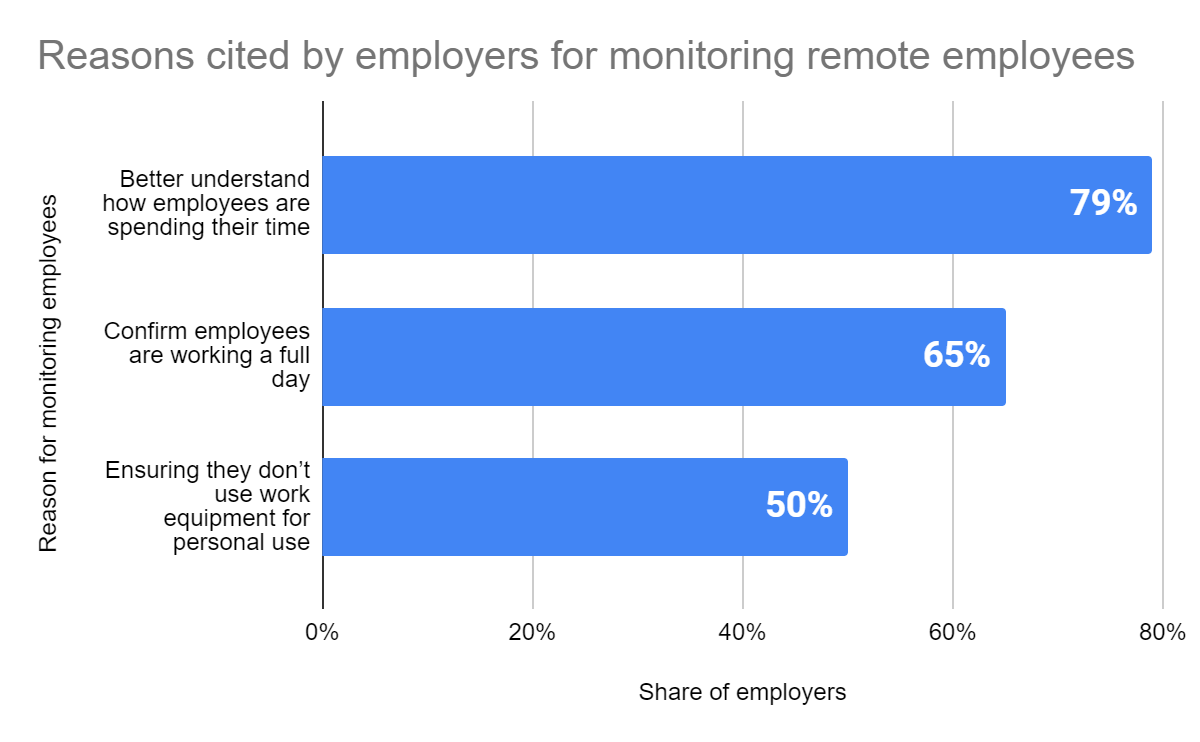
Remote work has grown dramatically. According to recent studies, 39% of workers now work remotely at least part-time. While remote work offers flexibility and often increases productivity, it also creates challenges for managers who need to understand how their team members are spending their time.
The Challenge
- You can’t see your team working, so you don’t know if they’re focused or distracted
- It’s hard to detect when employees need help or are struggling
- You can’t track if sensitive company data is being protected
- Project timelines become unclear without visibility into progress
- It’s difficult to identify who is actually contributing fairly to team goals
The Solution
Proper monitoring practices help you manage these challenges. When done correctly, monitoring boosts productivity by 30-40%, increases security, and helps managers make better decisions about their team.
Key Benefits of Monitoring
- Visibility into how time is actually spent
- Data-driven insights for better management decisions
- Identification of bottlenecks and productivity issues
- Enhanced security and data protection
- Early detection of employee burnout or disengagement
- Fair and transparent performance evaluation
The Ethical Foundation: Transparent & Fair Monitoring
Before implementing any monitoring system, understand that trust is everything. Monitoring done wrong destroys employee morale and engagement. Here’s how to do it ethically:
1. Be Transparent
Never secretly monitor remote employees. Tell them you’ll be tracking their work activities and explain why. Include monitoring policies in your employee handbook. Transparency builds trust; secrecy breeds resentment.
2. Monitor Work Activities Only
Focus on work-related metrics: time spent on tasks, project progress, communication, and productivity. Don’t monitor personal email, social media on personal time, or any non-work activities. Respect their privacy outside of work hours.
3. Use Data Fairly
Use monitoring data to help employees improve, not to punish them. If an employee has low productivity, this should trigger a conversation to understand why and provide support—not immediate discipline.
4. Keep It Proportional
A junior developer handling public documentation needs less monitoring than someone with access to customer data or financial information. Match monitoring intensity to the risk level of the role.
5. Check Local Laws
Different countries and states have different laws about employee monitoring. In the EU, GDPR heavily restricts what you can monitor. In California, workplace privacy laws are strict. Know your legal requirements before implementing any system.
7 Best Practices for Remote Employee Monitoring
Best Practice 1: Establish Clear Expectations
Before monitoring anything, define what “productive work” means for your company. What hours should employees work? What are the expected deliverables? How should they communicate with the team? When these expectations are clear, monitoring becomes about measuring compliance with known standards, not arbitrary evaluation.
Best Practice 2: Combine Quantitative and Qualitative Data
Don’t rely only on hours logged or keystrokes. Those metrics can be gamed. Instead, combine time tracking data with project completion, quality of work, communication, and peer feedback. A complete picture is more accurate than any single metric.
Best Practice 3: Hold Regular One-on-Ones
Use monitoring data as a conversation starter. “I noticed your productivity dipped last week. What’s going on? How can I help?” Regular conversations turn monitoring data into an opportunity for support and development, not surveillance.
Best Practice 4: Focus on Output, Not Activity
What matters is the work completed, not how many emails were sent or how long someone was at their desk. Some people work in focused 2-hour blocks. Others take many breaks. Judge by results, not activity logs.
Best Practice 5: Allow Flexibility
Remote work exists because it offers flexibility. If someone delivers quality work on time, does it matter if they work 9-5 or 10 am-6 pm? Does it matter if they take a long lunch break? Monitoring should ensure accountability without removing the flexibility that makes remote work attractive.
Best Practice 6: Communicate About Monitoring Tools
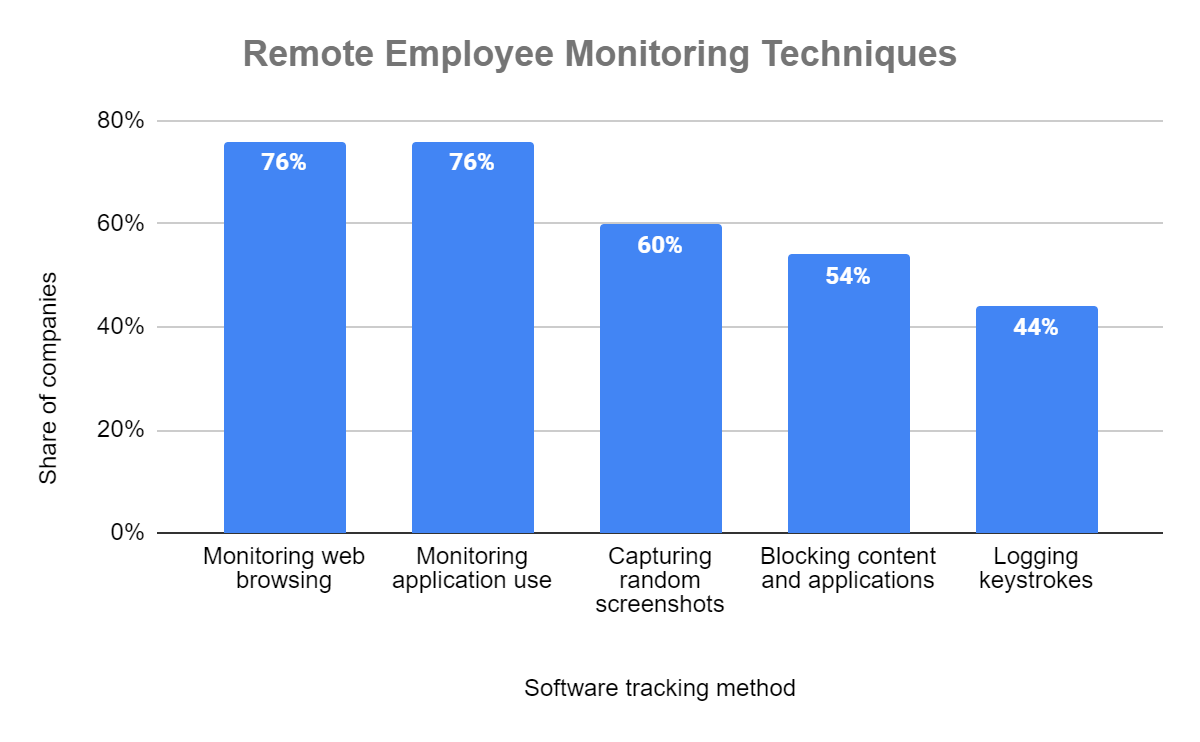
If you’re using monitoring software, tell employees exactly what it tracks. Many tools can monitor screen activity, websites visited, or keystroke frequency. Be honest. Hidden monitoring creates a culture of fear and distrust.
Best Practice 7: Review Your Monitoring Regularly
Is your monitoring helping you manage better? Are employees more productive? Is data actually being used for decision-making? If monitoring isn’t improving outcomes, it’s just surveillance. Review quarterly and adjust.
Methods to Monitor Remote Employees
There are many ways to monitor remote employee productivity and activity. Here are the most common and effective methods:
Method 1: Time and Productivity Tracking Software
Tools like ProHance and Time Doctor automatically track how employees spend their time. They show what applications are used, how long employees spend on each task, and idle time (when keyboards aren’t being used). This gives managers visibility into productivity patterns and helps identify where time is being wasted.
Method 2: Project Management Tools
Platforms like Asana, Monday.com, or Trello provide visibility into task progress. You can see what’s assigned, what’s in progress, what’s completed, and what’s overdue. This tells you how employees are managing their workload without needing invasive monitoring.
Method 3: Regular Check-Ins
Weekly or bi-weekly one-on-one meetings with employees provide the most valuable monitoring: direct communication. Ask about challenges, progress, and needs. This gives you insight into both productivity and employee wellbeing.
Method 4: Communication Platform Monitoring
Monitor communication in Slack, Teams, or email to understand collaboration patterns and identify bottlenecks. Are certain team members not communicating? Is there conflict? This data can reveal hidden issues affecting productivity.
Method 5: Performance Metrics
Track objective metrics: sales closed, support tickets resolved, code commits, articles published, etc. These directly measure output and are the most honest indicator of whether someone is actually working.
Method 6: Peer Review and Feedback
Colleagues often know better than managers if someone is pulling their weight. Include peer feedback in performance reviews. This creates accountability without requiring invasive monitoring.
Essential Features in Monitoring Tools
If you decide to use monitoring software, look for these key features:
1. Time Tracking
Automatic or manual tracking of hours worked. Shows when employees are actually working and when they’re idle. Essential for freelancers and hourly employees.
2. Application & Website Monitoring
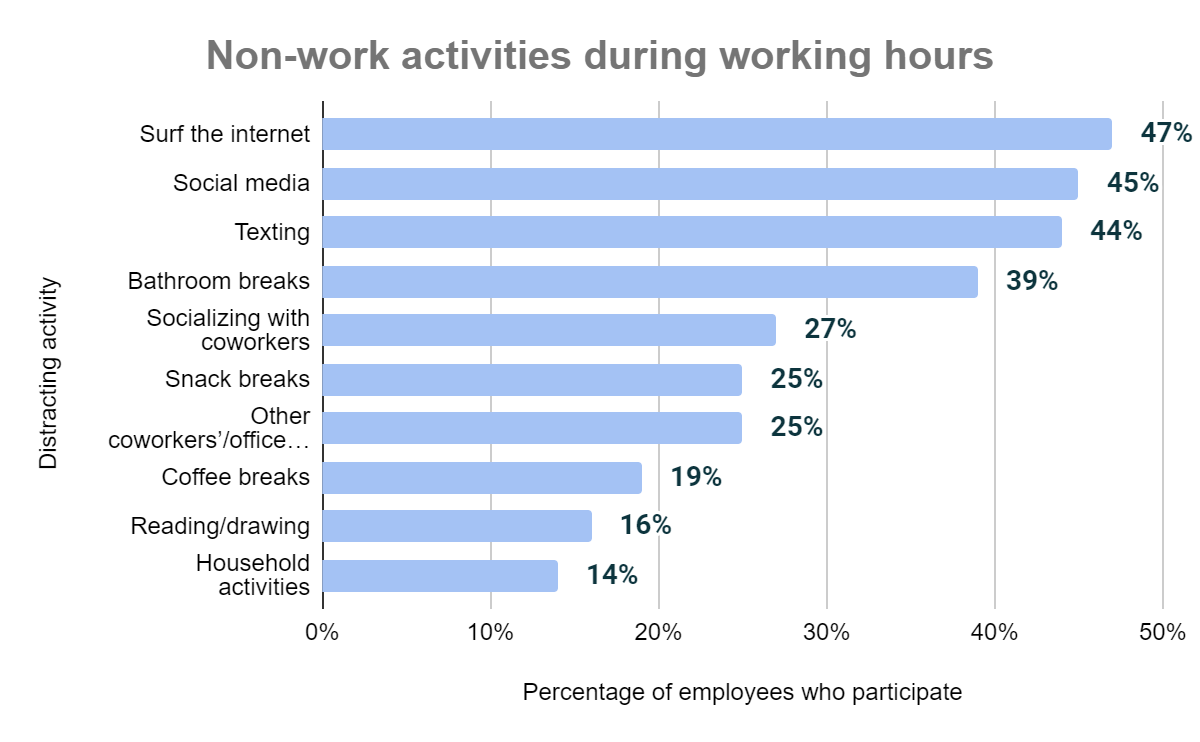
Shows which applications and websites employees use and for how long. Helps identify if they’re spending time on non-work activities.
3. Activity Alerts
Notifications when unusual activity occurs: someone accessing sensitive files outside normal hours, downloading large amounts of data, or leaving work computer unattended.
4. Detailed Reporting
Generate reports showing productivity trends, time allocation, and performance metrics. Use this data for management decisions and employee feedback.
5. Data Security & Privacy
Ensure the tool encrypts data, complies with GDPR and local privacy laws, and gives employees control over what’s monitored.
6. Integration with Other Tools
The tool should work with project management software, communication platforms, and payroll systems you already use.
7. Mobile Access
If your team works on phones or tablets, ensure the tool works on mobile devices and provides full mobile functionality.
Common Mistakes in Remote Monitoring
Avoid these monitoring mistakes that damage trust and actually reduce productivity:
Mistake 1: Secret Monitoring
Installing monitoring software without telling employees is illegal in many places and will destroy trust if discovered. Always get consent.
Mistake 2: Monitoring Personal Devices
Employees have a right to privacy on personal devices. Monitor company-issued devices only.
Mistake 3: Obsessing Over Metrics
High hours logged doesn’t mean high productivity. Someone might log 10 hours but waste 6 of them. Focus on actual output, not activity metrics.
Mistake 4: Using Monitoring as Punishment
If you use data only to catch people slacking, monitoring becomes a tool of punishment, not management. Use it for coaching and support too.
Mistake 5: Ignoring Context
Low activity might mean someone is struggling, not lazy. They might be taking care of a sick family member. Always dig deeper before judging the data.
Mistake 6: Not Communicating Results
If you monitor employees but never share feedback, they don’t know how to improve. Use monitoring data in regular feedback conversations.
Measuring Success: Monitoring Metrics That Matter
How do you know if your monitoring is actually working? Track these metrics:
Productivity Metrics
- Tasks completed per week or month
- Projects delivered on time
- Quality of deliverables (fewer bugs, rework, or revisions)
- Revenue generated or cost savings created
Engagement Metrics
- Employee satisfaction scores (should not decrease after implementing monitoring)
- Turnover rates (high turnover after monitoring = problem)
- Communication frequency (staying the same or increasing)
- Participation in meetings and team activities
Security Metrics
- Data breaches or unauthorized access incidents
- Policy violations or compliance issues detected
- Security incident response time
Conclusion: Monitoring Done Right
Monitoring remote employees is necessary, but it must be done ethically and strategically. The goal isn’t surveillance—it’s visibility. You want to understand how your team works, where bottlenecks exist, and how to support their success.
Remember the key principles: Be transparent about what you monitor. Focus on work activities and output, not surveillance. Use data to support employees, not punish them. Combine monitoring tools with regular communication and check-ins. Follow local laws.
When monitoring is implemented correctly, it actually strengthens your relationship with employees because it removes ambiguity. Everyone knows what’s expected, everyone knows how they’re being measured, and managers can provide fair, objective feedback.
Remote work is here to stay. Learning to manage it effectively—with appropriate monitoring and trust—is one of the most important skills for modern managers.
FAQs
Is it legal to monitor remote employees?
In most places, yes—with conditions. You must tell employees they’re being monitored, the monitoring must be work-related and reasonable, and you must comply with local privacy laws. In the EU, GDPR restricts monitoring heavily. In California, you need consent and must focus on work activities. Consult a lawyer about your specific location.
Will monitoring reduce trust with my team?
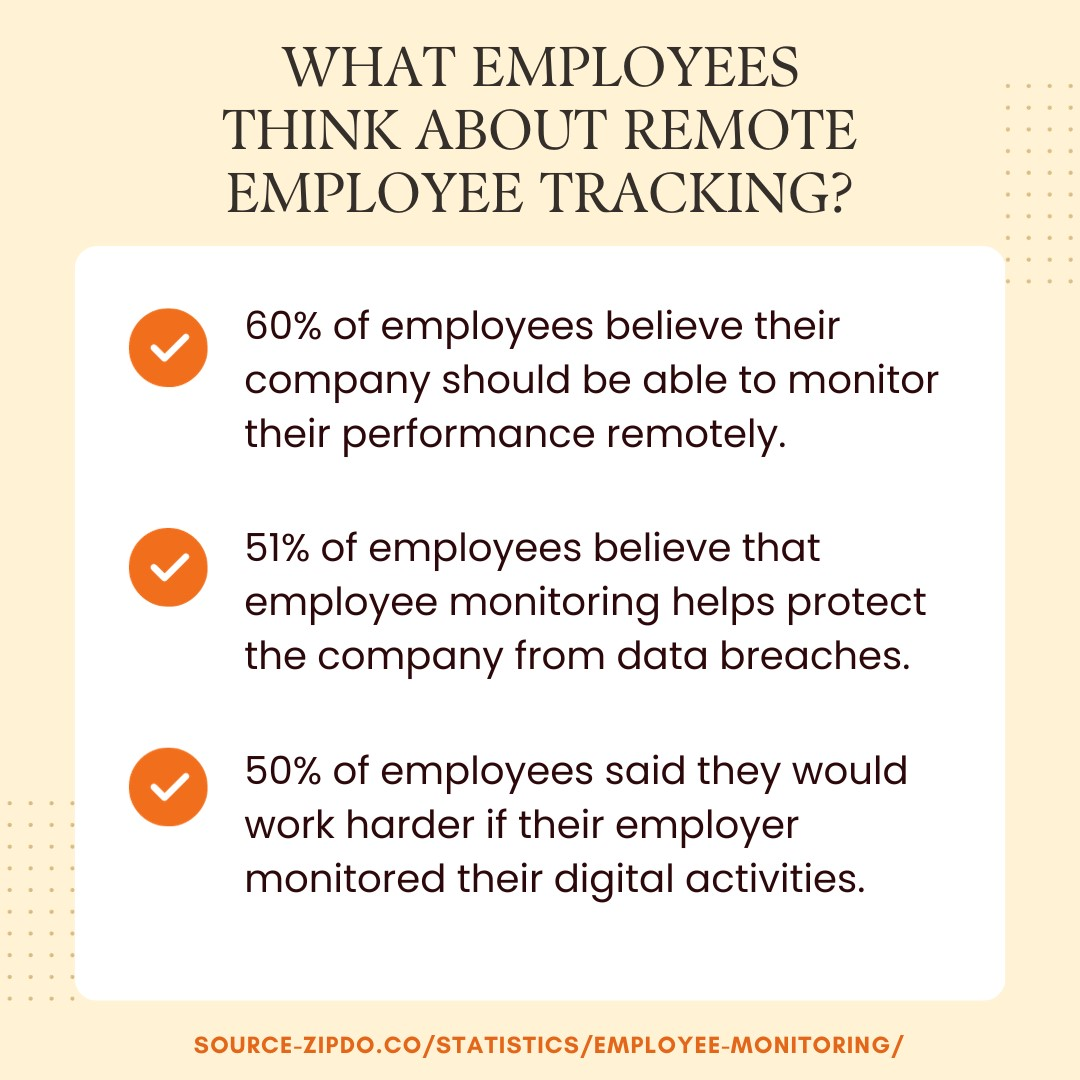
Only if done poorly. Secret monitoring or overly invasive monitoring will destroy trust. Transparent monitoring that respects privacy and focuses on output actually builds trust because it’s fair and objective.
Can I monitor during non-work hours?
No. Respect employees’ personal time. Only monitor during designated work hours. If someone chooses to work in the evening, that’s fine—monitor it during the hours they work, but don’t track what they do outside work.
How do I handle employees who refuse monitoring?
Have a conversation about why it’s needed and what you’ll monitor. If they still refuse, decide if this is a dealbreaker for the role. Some positions require it (especially those handling sensitive data), others don’t. Be clear about expectations when hiring.
What if monitoring shows one employee is very unproductive?
Don’t discipline them immediately. Use it as a starting point for conversation. “Your productivity metrics are lower than the team average. What’s going on? Do you need help?” They might be struggling with a personal issue, unclear about expectations, or burnt out. Address the underlying problem, not the symptom.
Which monitoring tool is best?
It depends on your needs. For simple time tracking, try Toggl or Clockify. For comprehensive monitoring, consider ProHance or Time Doctor. For project-based monitoring, Asana or Monday.com work well. For security-focused monitoring, Teramind or Ekran System are strong. Choose based on your specific requirements and budget.
Can I monitor contractors the same way as employees?
Yes, but be extra clear about monitoring in the contract. Contractors are independent, so they may be more sensitive to invasive monitoring. Keep it focused on deliverables rather than activity.
How does monitoring help prevent burnout?
Remote productivity tracking software can be a valuable tool for organizations that aim to improve remote productivity. It offers insights into employee activities and helps measure performance against goals.
How can productivity be measured without invading privacy?
By limiting monitoring to work-related data, focusing on outcomes, and using aggregated analytics rather than personal activity tracking.
Learn how ProHance can help

Shikha Mishra
Shikha is a seasoned journalist and PR professional with over 20 years of experience. She has written for prestigious publications such as The Hindustan Times, Times of India, and Gulf News. She specializes in writing, editing, Public Relations and Corporate Communications. Shikha also excels in digital and traditional marketing, social media, and brand building.
